
Mar 18, 2026 · 7 min read
Security lessons: the default password that let a miner in
- security
- web
- architecture
Layered architecture, least privilege, Docker and monitoring all held. One default password on an open SSH port didn't. The security lessons that stuck.
What actually protected a system I built, what didn't, and how one default password on an open SSH port beat every clever layer we had. Architecture, least privilege, container isolation, monitoring, a red-versus-blue test, and the boring mistake underneath it all.
One semester I built a secure distributed-computing system with a small team. The brief sounded simple: a web app where a user uploads a script, an API that hands it off, and a cluster of worker nodes that run it in parallel and send back the result. "Secure" was in the assignment title. Useful, because it makes you justify every layer instead of bolting protection on at the end.
Looking back, almost everything that protected us was boring. The one thing that bit us was even more boring than that.
Secure API architecture starts before the code
The most important security decision happened before anyone wrote a feature: the shape of the API. We went with a classic three-layer design:
- an API layer that talks to the outside world,
- a business-logic layer that does the actual thinking,
- a data-access layer that talks to the database and any external sources.
What turns that from tidy code into a security property is strict separation. The API layer can only call business logic. It is never allowed to reach the data-access layer directly. The layers talk through interfaces, so they don't bleed into each other.
Why does that matter for security? Because the unsafe path stops existing. A request from outside cannot reach the database without passing through the logic that validates it. You can't forget the check, because there's no route that skips it.
Bonus: because the layers only know each other through interfaces, you can swap the data layer or refactor the logic without touching the part that faces the internet. Secure design and maintainable design turn out to be the same design.
The principle of least privilege, everywhere
A handful of habits did most of the actual protecting. They all come back to one rule: give every component the smallest amount of power it needs to do its job.
- An ORM instead of hand-written SQL. With Entity Framework we worked with models, not query strings. That shuts out a whole class of SQL injection by default: you'd have to go out of your way to build a raw, unsafe query. The safe option is also the easy one.
- A scoped database user. The API connects with a database account that can run only the specific queries the API needs. Nothing else. If the API is ever compromised, the blast radius is that short list of operations, not the whole database.
- Secrets out of the source. Connection strings, keys, IP addresses and the JWT configuration lived in app settings, outside the code. The program references them. They aren't baked into the build for anyone reading or reverse-engineering it.
None of this is clever. All of it quietly prevents the incidents you never hear about, because they never happened.
Client-side password hashing: make plaintext impossible
Authentication is where it's easiest to get lazy, so we tried to design the laziness out. When a user logs in, the server sends back the salt stored for that username. The browser combines the salt with the password, hashes the result with SHA-256, and only that hash travels over the network to be compared with the stored value. The plain password never leaves the device.
This isn't a replacement for TLS, and it doesn't make you immune to everything. It's belt and braces. Defence in depth means assuming any one control can fail, and making sure that failure isn't a disaster on its own.
Live progress updates from the cluster came in over a WebSocket, and each connection was tied to a token, so the system always knew which client a result belonged to. The live feed is the UX feature. The token is what keeps one user's results out of another user's session.
Run untrusted code in Docker containers
A system that runs uploaded scripts has a special problem: by design, you execute code you didn't write on your own machines. Early on our workers ran directly on the host machines, so the master process effectively had full access to those hosts, including reading and deleting files. That is far too much trust to hand to a random uploaded script.
The fix was Docker. Each worker runs in a container, so an uploaded script is boxed into an isolated environment instead of touching the host. A new worker became "clone two files and start the container". More importantly, a malicious or buggy script can't reach past the container walls. Isolation turned a scary amount of implicit trust into something bounded and disposable.
Security monitoring with Wazuh and Elastic
You can't respond to what you can't see. We built monitoring on Wazuh and Elastic from three angles: performance and health, security events, and malware detection.
The security dashboard mapped alerts to MITRE ATT&CK tactics. Instead of a flat list of log lines, we saw categories like initial access, privilege escalation, persistence and lateral movement, each with a count and a timeline. Monitoring is the layer that turns "we hope nothing is wrong" into "we'd notice if it were".
Red team vs blue team: let someone else break it
We ran a red-versus-blue exercise. Humbling, in the most useful way. Most of our defences held, which felt great for about a minute. Then the attackers found the gaps we'd stopped looking at:
- no CSRF token on the API,
- a login cookie missing its
HttpOnlyandSecureflags.
Both are one-line fixes. Both are invisible until somebody goes looking. That's the whole case for adversarial testing: stop grading your own homework, and let someone whose job is to find the hole find it. I go deeper into how that works in the anatomy of a security assessment.
The default password on an open SSH port
Here's the part I think about most. To update the website, we'd left an SSH port
open to the internet, on a server that still had its placeholder credentials:
student and student. Someone found it, logged straight in and installed a
crypto-miner. It ate the machine's resources until our network's IP address was
pulled offline while we cleaned up the mess.
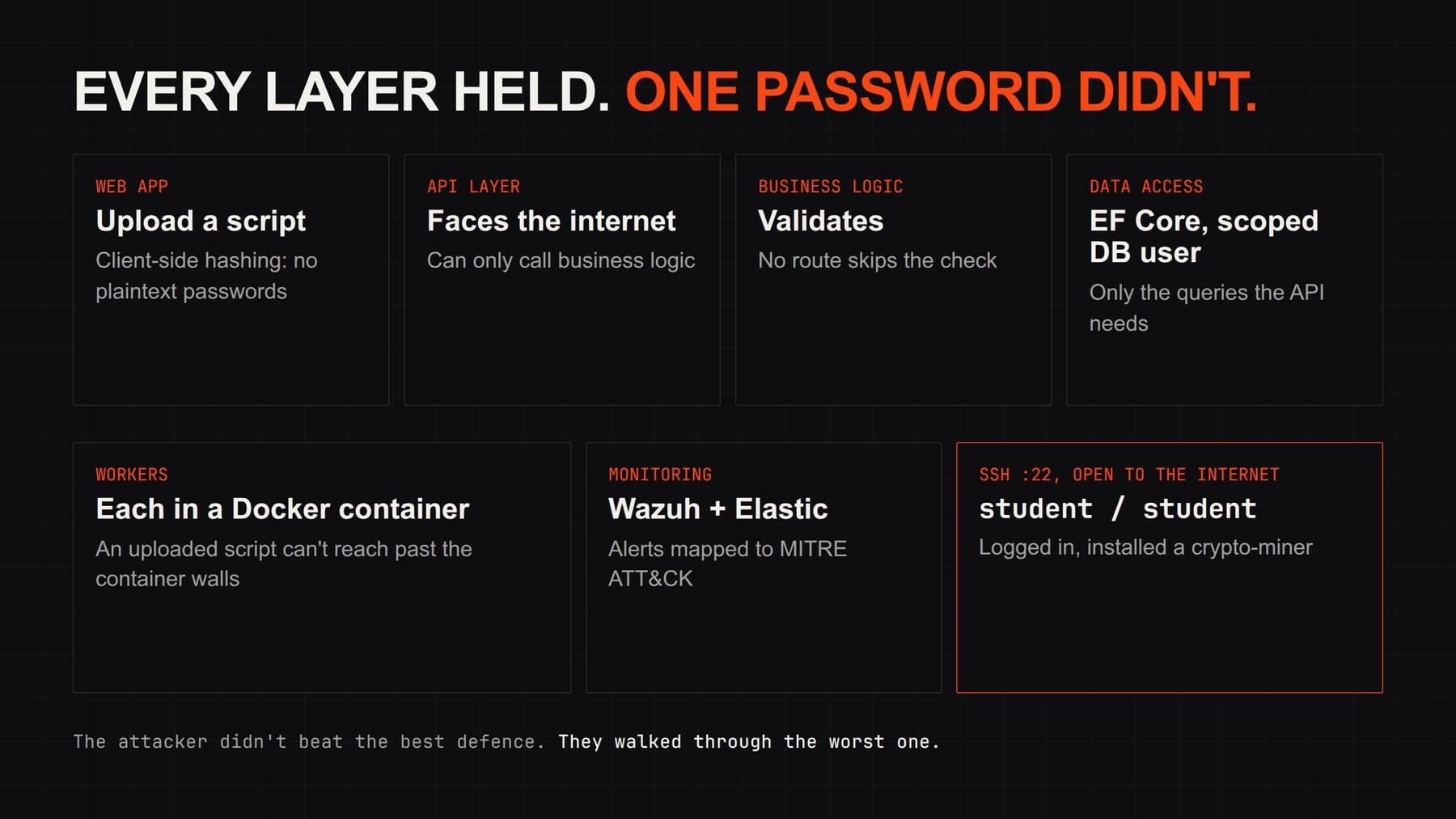
Sit with that for a second. The layered architecture, the scoped database user, the client-side hashing, the container isolation, the monitoring. All of it bypassed by one default password on one exposed port. The attacker didn't beat our best defence. They strolled through our worst one.
The fix was as boring as the mistake:
- Set a real password.
- Make the SSH port reachable only from inside the network, so it isn't sitting on the public internet at all.
Hunt for the weakest default first
Your system is exactly as strong as its weakest default. Good architecture, least privilege, sensible hashing and real monitoring are genuine wins, but they're ceilings, not floors. An attacker doesn't fight the strongest part of your design. They look for the dumbest open door and walk through it.
So now, before I admire any of the clever pieces, I go hunting for the unglamorous failure:
- the default credential,
- the exposed port,
- the missing cookie flag,
- the service that should never have been reachable.
That's almost always where the real risk lives. And it's almost always the cheapest thing to fix. It's also why I make security the default from the first line, and why the servers I set up for clients start locked down. That's what infrastructure means here.
One open door. That's all it takes. Close it before someone else finds it.