
Feb 12, 2026 · 8 min read
VBA macro attacks: why Office macros still won't die
- security
- red-teaming
- research
Red-team research into VBA macro attacks: how attackers got around Microsoft's Mark of the Web block, how VBA stomping fools antivirus, and the fixes that work.
Office macros are not dead. This post covers why VBA macro attacks still work after Microsoft's block, how attackers route around it, how they slip past antivirus, what my own lab tests showed, and the defences that actually help.
During my cybersecurity studies I spent a semester on a question that sounds almost dated: are Office macros still worth anything to an attacker in 2026? Microsoft has spent years hardening them, the security press keeps writing their obituary, and red teams still reach for them. I wanted to know why. So I read the literature, built a lab and tested the techniques hands-on instead of taking anyone's word for it.
The short answer: macros didn't die, they changed shape. The long answer is the whole of offensive security in miniature. Defenders raise the cost. Attackers route around it.
What is a VBA macro?
A macro is a small script embedded in an Office document. In Word and Excel it's written in VBA (Visual Basic for Applications); older Excel files use a separate macro language called XLM. They exist for a good reason: automating repetitive work. Someone in finance presses one button and the spreadsheet reformats itself, pulls data and builds a report.
The same power makes them dangerous:
- VBA has direct access to the Windows API and the shell, so a macro can do almost anything the logged-in user can.
- A macro can run the moment a document opens, through triggers like
AutoOpen()in Word orWorkbook_Open()in Excel.
Add a convincing phishing email and a victim who clicks "Enable content", and you have code running on the target machine. From there a malicious macro can download a payload, run PowerShell, harvest system data, set up persistence or open a reverse shell.
A short history of macro malware
You can't see where macro attacks are going without seeing where they've been.
- 2019 to 2021, the comeback. Malware families like TrickBot and QakBot leaned hard on macros, often the old XLM kind, to deliver payloads through weaponised spreadsheets. Detection rates were low and the technique was cheap, so it spread.
- 2022, the turning point. Microsoft started blocking VBA macros in files that carry the Mark of the Web, the hidden tag Windows puts on anything downloaded from the internet. A document from an email or a website now refused to run its macro. Macro-based phishing dropped off a cliff almost overnight, and plenty of people declared the technique dead.
- 2023 to 2024, the adaptation. Attackers treated the block as a routing problem and went around it.
If the story ended in 2022, the obituaries would be right. It didn't.
How attackers bypass the Mark of the Web
Block the easy path and the water just runs downhill somewhere else. My research kept turning up the same handful of adaptations, all with one theme: stop letting the macro carry the danger, and stop letting the dangerous file get tagged.
- Container smuggling. The payload goes inside an
.ISO,.IMGor an archive like.ZIPor.RAR, often paired with an.LNKshortcut. The Mark of the Web lands on the container, not on the file the victim runs, so the macro warning never appears. - Trusted location abuse. The document is dropped straight into a folder Office
already trusts, such as the templates directory under
%AppData%, where macro warnings and the Mark of the Web don't apply. - Living off the land (LOLBins). Instead of dropping new tools antivirus might
flag, attackers abuse legitimate signed Windows binaries:
mshta.exe,regsvr32.exe,wscript.exe,powershell.exe. The OS trusts them, so a lot of endpoint protection waves them through. A classic:regsvr32.exeloading a remote scriptlet, no admin rights needed, looking like normal system behaviour. - Cloud delivery. The next stage sits on OneDrive or SharePoint and is fetched through trusted, authenticated APIs, even the Microsoft Graph API. That gets past a lot of URL filtering and reputation scoring, because the request goes to a domain everyone already trusts.
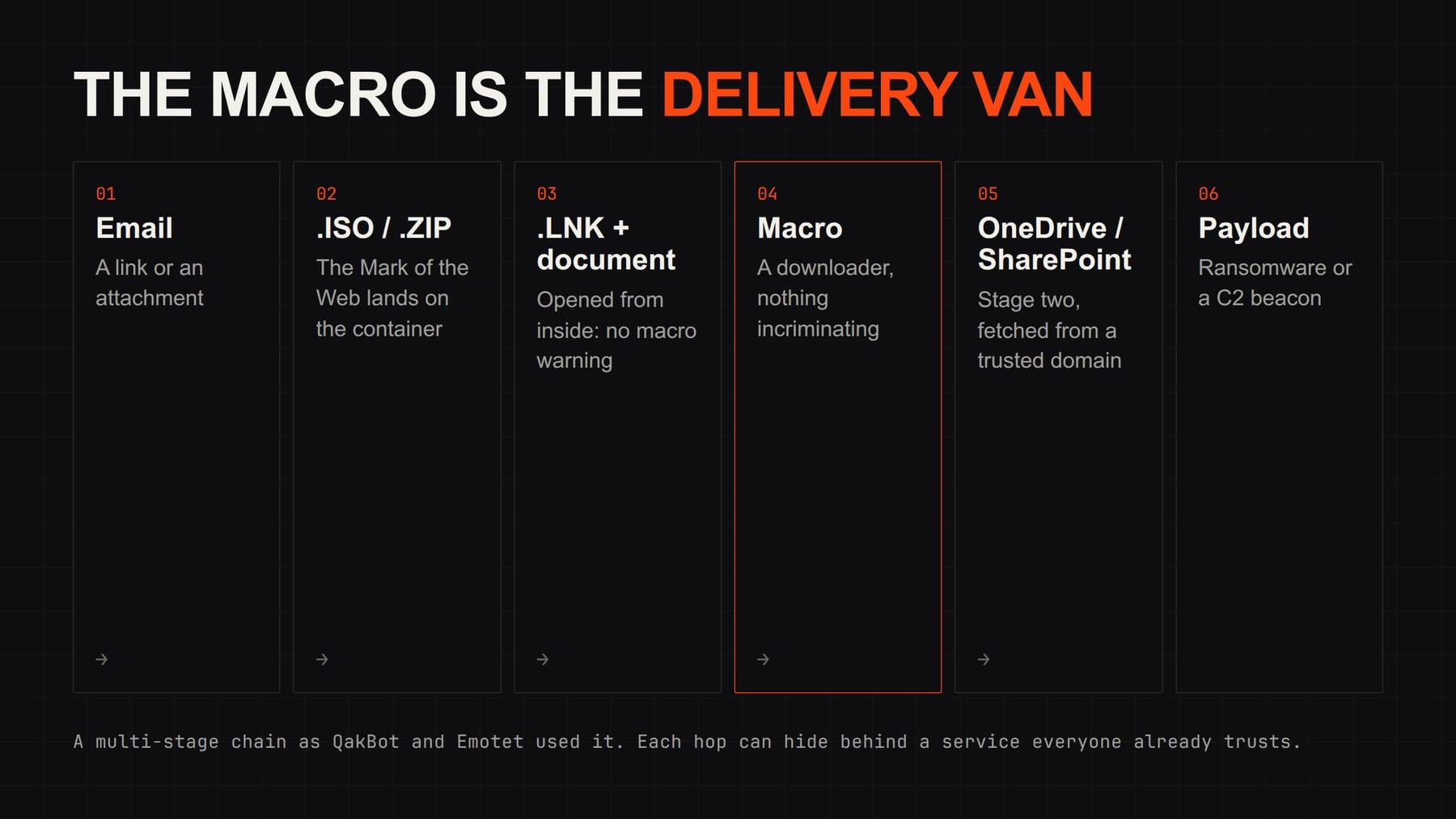
- Multi-stage payloads. The document carries nothing incriminating. It's a downloader. Stage one pulls stage two, which pulls the real malware: ransomware or a command-and-control beacon. The attacker can swap the payload without touching the document, and each hop can hide behind a trusted service. QakBot and Emotet used exactly this structure.
The macro stops being the weapon. It becomes the delivery van.
Antivirus evasion: VBA stomping and obfuscation
The other half of my research was evasion: staying invisible to scanners. This is where the cleverness lives, and the best techniques are simple.
VBA stomping. This one surprised me. Tools like EvilClippy exploit a quirk in how Office stores macros. There's the readable VBA source, and there's the compiled "p-code" that actually runs. If the Office version matches, Office runs the p-code and ignores the source. So EvilClippy strips or replaces the visible source and leaves the working p-code intact. Static analysers and many antivirus engines read the source, find nothing, and move on. The real logic still runs.
Obfuscation, in layers. The academic literature splits it into a neat taxonomy, and each layer beats a different kind of detection:
- Random: meaningful names become gibberish like
COHdDxBvIVN, which beats keyword and signature matching without changing behaviour. - Split: a command string is broken into pieces and rebuilt at runtime, so a
scanner looking for
powershellor a known URL only finds fragments. - Encoding: the payload hides as Base64 or a byte array and looks like meaningless data until it's decoded in memory.
- Call: methods are invoked indirectly, for example through
CallByName, so the direct API calls antivirus flags never appear literally. - Logical: the real logic is buried in piles of harmless filler code, so a human analyst drowns in noise.
LOLBins, again. They're the connective tissue. Once you're executing, leaning on trusted binaries instead of dropping files keeps the whole chain quiet.
What my lab tests showed
Theory is cheap, so I tested it.
VirusTotal before and after. I built a malicious test document with a reverse shell and ran it through VirusTotal: 46 engines flagged it. Then I gave the same file one VBA-stomping pass with EvilClippy and submitted it again. Detections dropped by roughly a third to a half. The logic never changed, only its appearance, and that was enough to walk past a wall of antivirus engines. That's the whole argument in one number.
The Mark of the Web bypass, end to end. I made a macro-enabled spreadsheet, hosted it, and confirmed that a downloaded copy shows the expected "untrusted source" warning. Then I wrapped the same file in a self-extracting executable. Now the Mark of the Web lands on the executable, and once it extracts, the spreadsheet inside carries no tag. All that stands between the victim and execution is the ordinary "enable content" prompt. It only works if the social engineering gets someone to run the installer. Which is exactly the point: the technical control is intact, and the human is the bypass.
A reverse shell from a Word file. In a separate demo I used a custom tool that
generates obfuscated PowerShell reverse shells, put the command behind AutoOpen(),
and watched a "victim" machine connect back the instant the document opened. Full
remote control, out of a Word file you'd happily double-click in a real inbox. No
slide deck makes the risk that concrete.
How to defend against macro attacks
The uncomfortable finding: the fixes that work are mundane.
- Disable macros entirely if your organisation doesn't use them. Removing the attack surface beats every detection trick.
- Train people. Almost every chain in my research started with a human enabling content or running an installer. Awareness isn't a soft, optional control here. It is the control.
- Patch and update, so known evasion tricks and version-specific quirks lose their footing.
- Layer your detection. Good email security plus EDR catches a real share of obfuscated payloads even when a single antivirus engine misses, and monitoring for LOLBin abuse closes the gap signature scanning leaves open.
Same pattern as in the anatomy of a security assessment: the phishing test there and the macros here both come down to one person clicking one button. And the fixes are as boring as the ones in the unglamorous security wins.
Harder is not gone
Microsoft made macros harder, and that's a real win. But harder isn't gone. As long as a document can ask a human to click one button, and trusted binaries and trusted clouds exist to hide behind, macros stay relevant.
That's the rhythm of the whole field. A defender raises the cost, attackers find the next cheapest path, and the human in front of the screen stays the most reliable way in. The best defences aren't clever. They're the boring, consistent ones, applied to the boring, consistent ways people actually get compromised.
It's why the servers and networks I set up start locked down. Secure is the default here, not an extra.