
Jul 25, 2026 · 7 min read
Notification system design: sending is the easy part
- architecture
- backend
- security
Sending a notification took me an afternoon. Deciding who it's for, what 'read' means and when it dies took the rest. How I designed the notification system.
Here's how I designed a notification system for a logistics dashboard, and why delivery was the smallest part of it. The real work was addressing and state: who a message is for, what "read" means when several people get it, and when it should disappear.
It started halfway through a prototype demo, with the question that quietly rewrites a backlog: "can it also let me know?" The dashboard did its job. The information was there and people could find it. But a dashboard only works while you're looking at it. A planner needs a ping the moment a container has been standing too long. A driver wants to know his sick note was approved without opening anything. Management wants a record that a planner acted on the alert.
Sounds like a feature. It's an afternoon: a table, a POST route, a bell icon. I built exactly that first, and it worked. Then came the questions the afternoon version had no answer for. Not one of them was about delivery.
Notification service: inside the app or on its own?
The first fork: do notifications live inside the dashboard's backend, or on their own? Inside was tempting, and it's the right call more often than architecture posts admit. No extra deployment, no extra secret, no extra thing to keep alive at 3am.
What tipped it was one sentence from the client's own developer: whatever I built had to be reusable by their other products. Picture a second product publishing a notification and "inside the dashboard" gets strange fast. A message from a warehouse kiosk isn't a dashboard feature, but it would have to travel through dashboard routes and carry dashboard auth to get out.
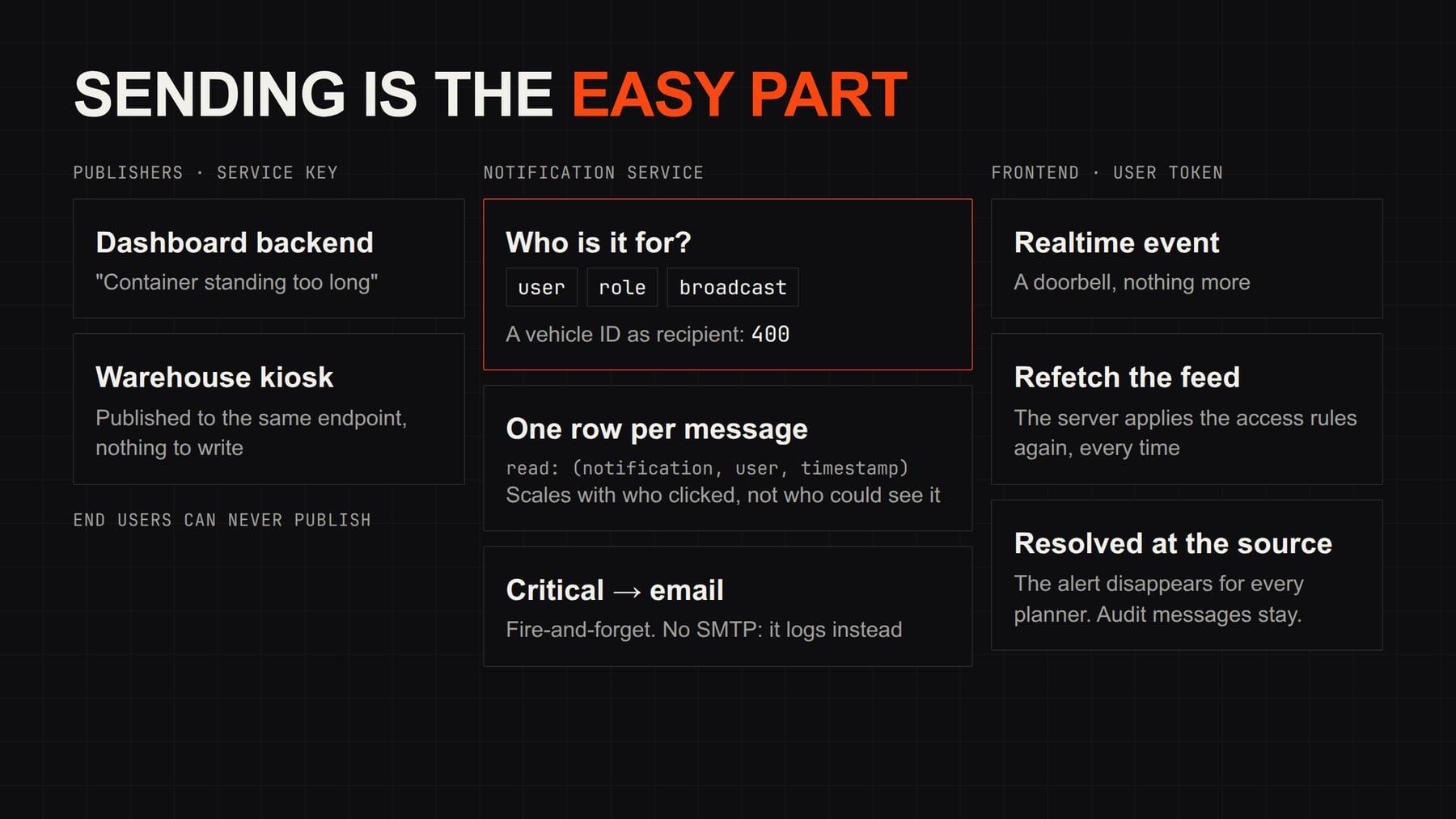
So it became its own small service. Publishers POST to it, end users read from it, and it knows nothing about anyone's business logic. It checks who a message is for and how urgent it is, and publishes.
The third option, letting the frontend subscribe to the collection and filter client-side, I ruled out on the spot. That puts every audience rule in code the user controls, so the user can switch it off. Fine for a read-only screen in a hallway. Not fine for a system that carries audit messages about people's actions.
The bill came straight away, in extra infrastructure. The payoff came a few weeks later when the kiosk work started and there was nothing to write. It published to the same endpoint, and the audience layer already worked.
Notification audiences: user, role, broadcast
Everything downstream gets easier once you commit to a small vocabulary. I settled on three audiences and refused to add a fourth:
- user: one exact recipient. "Your sick note was approved."
- role: everyone holding a role. "Container standing too long" to all planners.
- broadcast: everyone signed in. "Maintenance tomorrow morning."
That's the whole model. Deliberately boring. It's why the rest of the service stayed small.
Read state when a message has more than one recipient
This is where the afternoon version fell apart. My rows had a read boolean,
which is what everyone writes first. It's correct right up until a message has
more than one recipient. Planner A opens the alert, marks it read, and it vanishes
for planner B, who never saw it.
The bug isn't in the code. The data model claims "read" belongs to the message. It doesn't. It belongs to the pair: this message, this person.
The obvious fix is fan-out: one row per recipient, so a role message to four planners writes four rows, each with its own read state. Simple, it works, and I still didn't do it. Four rows is fine. A broadcast to two hundred users is two hundred rows and two hundred realtime events for one sentence about maintenance. Worse, membership isn't frozen. Hire a planner on Tuesday and you have to decide whether to mint rows for Monday's messages after the fact. Every answer to that is unpleasant.
So the message stays a single row, and read state lives in its own small
collection of (notification, user, timestamp) records. The server joins the two
when it builds your feed. What I like is how it scales: not with how many people
could see a message, but with how many actually clicked. A broadcast nobody
opens costs one row.
Single-recipient messages keep the plain boolean, because a join table for one recipient buys you nothing. The frontend never learns there are two mechanisms. It asks for a feed and gets a feed.
Notifications have to expire too
A notification that outlives its reason is noise, and noise trains people to ignore the bell. When a planner marks a container alert as handled, the alert has to disappear for every planner, not just the one who did the work. That's one call from the source mutation: here's what changed, clean up after it.
Audit messages are excluded from that sweep on purpose. They exist so management can see that something happened. Letting the action erase its own paper trail would defeat the point. Management clears those by reading them.
Realtime notifications without a WebSocket server
I wanted my own WebSocket server. I had it half-designed before admitting I'd be rebuilding reconnects, heartbeats and channel fan-out that the backend platform already ships. So the service writes the row, the platform's realtime layer pushes the event, and the frontend treats that event as a doorbell: a nudge to refetch, nothing more.
The discipline is in that refetch. The server applies the access rules again, every time. The client filters what it receives as well, but only so nothing flickers on screen before disappearing. That filter is not a security control. Pretend it is and you've built a "secure" system whose rules live in the browser's DevTools.
Anything marked critical also sends an email, fire-and-forget. A mail server having a bad afternoon must never block a notification from being published. With no SMTP configured at all, the service logs what it would have sent instead of failing. Local development and CI stay quiet, with no stray emails.
Two doors, two keys
There are exactly two ways in. Publisher backends use a shared service key. End users use their own token. The rule that falls out of that split is the one that matters: an end user can never publish. If they could, "send an email on critical" becomes a spam cannon aimed at their colleagues, authorised by their own login.
One more guard earned its place through paranoia. Drivers sign in on shared tablets with a PIN, so their identity is tied to a vehicle, not a person. If a publisher ever puts one of those vehicle identifiers in the recipient field, a message meant for one person lands on every tablet with that ID. The service rejects it with a 400. Five lines, in one place, protecting every current and future publisher without any of them knowing it exists.
That's what security as a default looks like in practice: small, boring checks where the data comes in.
What I left out on purpose
Mobile push isn't built, because there's no mobile app to push to. What I did make sure of is that the shape of the service doesn't block it. Publishers hand over an audience, a severity and a body. They know nothing about channels. Adding push later is a new module next to the mailer, and not one line changes in any publisher. That's the whole reason to keep publishers ignorant.
Cross-tab read sync is missing too. Open the dashboard twice and it can take up to a minute for one tab to notice the other marked something read. I priced a second realtime channel against that annoyance and decided a minute is fine. It might not stay fine. Better to write that down than pretend the gap isn't there.
Notifications are an identity problem
Nobody asks for a notification system. They ask to be told when something happens. That sounds like plumbing. It's a design problem about identity: who is this for, what does "seen" mean for them, and when does it stop being true.
Get those three right and delivery really is the afternoon it looked like. Get them wrong and you ship the boolean, watch one person's click erase everyone else's alert, and rebuild the whole d*mn thing anyway. Only now your users have already learned to ignore the bell.
Want to know which actions should notify someone? Ask your users. Mine told me in a usability test. And if you need a backend like this built, tell me about it.